How Drag-and-Drop Works (Technical Overview)
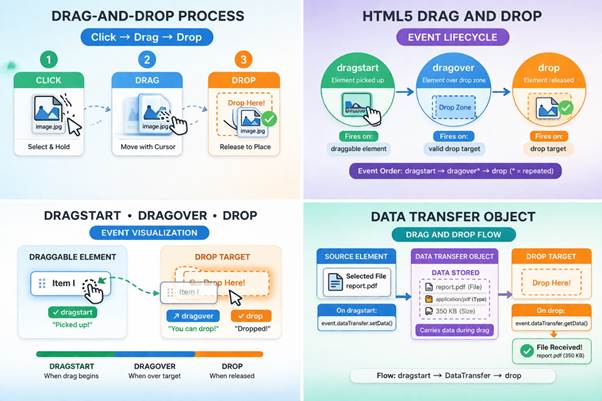
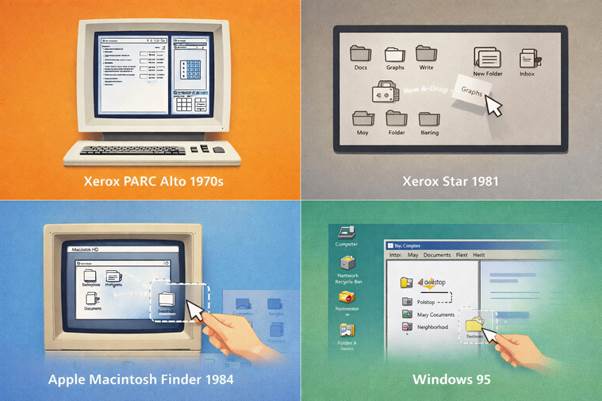
The technical foundation of drag-and-drop is based on event-driven programming, where user actions trigger a sequence of system responses. This model became more standardized with the introduction of HTML5 in 2009, which defined how browsers should handle drag-and-drop interactions. The process involves detecting input events such as mouse clicks or touch gestures and translating them into object movement on the screen. Behind the scenes, the system continuously tracks cursor position and updates the interface in real time using optimized CPU performance and efficient ram usage. This interaction relies on multiple coordinated components, including event listeners, rendering engines, and data transfer mechanisms. Early concepts of event-driven interaction can be traced back to research at Xerox PARC (California, USA) in the 1970s, where graphical systems began responding dynamically to user input. Modern implementations are far more complex, supporting cross-application communication and advanced UI feedback. Developers use JavaScript and browser APIs to control each phase of the interaction, often supported by web development frameworks. Understanding this technical workflow is essential for building responsive and efficient applications.
Basic Mechanism (Click → Drag → Drop)
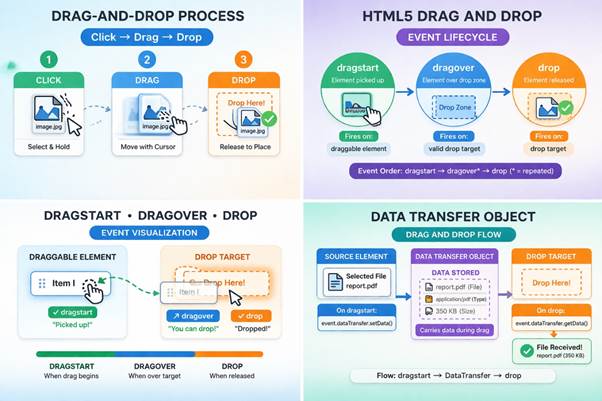
The core mechanism of drag-and-drop follows a three-step interaction model: click, drag, and drop. When a user presses a mouse button or touches the screen, the system registers the initial selection of an element. This step activates the object and prepares it for movement within the interface. As the user moves the pointer or finger, the system continuously updates the position of the selected element, often rendering a visual representation such as a floating or semi-transparent version. This real-time feedback ensures that users can track the object’s movement accurately. The dragging phase involves constant communication between the input device and the rendering engine, powered by modern processors for smooth performance. When the user releases the input, the system triggers the drop action, completing the interaction. At this point, the application determines
The technical foundation of drag-and-drop is based on event-driven programming, where user actions trigger a sequence of system responses. This model became more standardized with the introduction of HTML5 in 2009, which defined how browsers should handle drag-and-drop interactions. The process involves detecting input events such as mouse clicks or touch gestures and translating them into object movement on the screen. Behind the scenes, the system continuously tracks cursor position and updates the interface in real time using optimized CPU performance and efficient ram usage. This interaction relies on multiple coordinated components, including event listeners, rendering engines, and data transfer mechanisms. Early concepts of event-driven interaction can be traced back to research at Xerox PARC (California, USA) in the 1970s, where graphical systems began responding dynamically to user input. Modern implementations are far more complex, supporting cross-application communication and advanced UI feedback. Developers use JavaScript and browser APIs to control each phase of the interaction, often supported by web development frameworks. Understanding this technical workflow is essential for building responsive and efficient applications.
Basic Mechanism (Click → Drag → Drop)
The core mechanism of drag-and-drop follows a three-step interaction model: click, drag, and drop. When a user presses a mouse button or touches the screen, the system registers the initial selection of an element. This step activates the object and prepares it for movement within the interface. As the user moves the pointer or finger, the system continuously updates the position of the selected element, often rendering a visual representation such as a floating or semi-transparent version. This real-time feedback ensures that users can track the object’s movement accurately. The dragging phase involves constant communication between the input device and the rendering engine, powered by modern processors for smooth performance. When the user releases the input, the system triggers the drop action, completing the interaction. At this point, the application determines
The technical foundation of drag-and-drop is based on event-driven programming, where user actions trigger a sequence of system responses. This model became more standardized with the introduction of HTML5 in 2009, which defined how browsers should handle drag-and-drop interactions. The process involves detecting input events such as mouse clicks or touch gestures and translating them into object movement on the screen. Behind the scenes, the system continuously tracks cursor position and updates the interface in real time using optimized CPU performance and efficient ram usage. This interaction relies on multiple coordinated components, including event listeners, rendering engines, and data transfer mechanisms. Early concepts of event-driven interaction can be traced back to research at Xerox PARC (California, USA) in the 1970s, where graphical systems began responding dynamically to user input. Modern implementations are far more complex, supporting cross-application communication and advanced UI feedback. Developers use JavaScript and browser APIs to control each phase of the interaction, often supported by web development frameworks. Understanding this technical workflow is essential for building responsive and efficient applications.
Basic Mechanism (Click → Drag → Drop)
The core mechanism of drag-and-drop follows a three-step interaction model: click, drag, and drop. When a user presses a mouse button or touches the screen, the system registers the initial selection of an element. This step activates the object and prepares it for movement within the interface. As the user moves the pointer or finger, the system continuously updates the position of the selected element, often rendering a visual representation such as a floating or semi-transparent version. This real-time feedback ensures that users can track the object’s movement accurately. The dragging phase involves constant communication between the input device and the rendering engine, powered by modern processors for smooth performance. When the user releases the input, the system triggers the drop action, completing the interaction. At this point, the application determines